Member portal
A member portal without passwords
The member page (Min sida) gives every member a place to see and manage their membership, on the association's own address and in its own look. Signing in is a link in an e-mail, so there is no account to create and no password to forget.
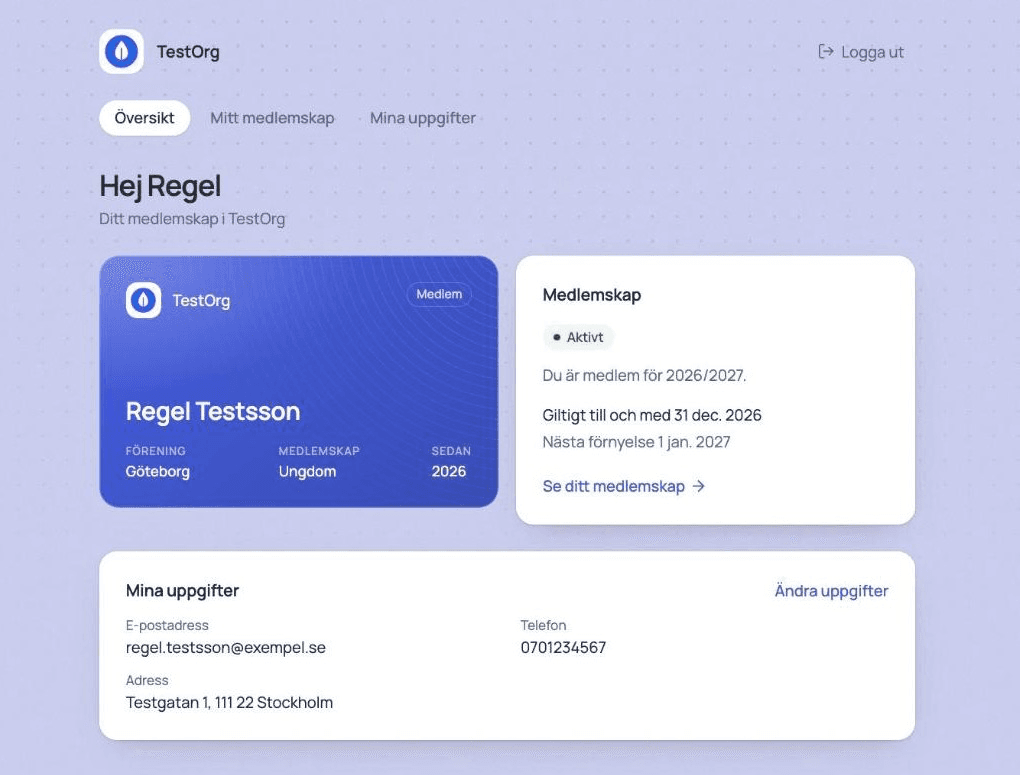
The membership in one place
The first thing a member sees is their membership card in the association's colour, with their name, association, level and the year they joined.
- Status: active, time to renew or awaiting confirmation.
- How long the membership is valid and when the next renewal is due.
- Past renewals, with the amount where one was paid.
Renew without hunting for the e-mail
When it is time to renew, the member does it right on their page, with the same rules as the renewal link.
- Free memberships are confirmed with one click, and fees are paid by card through the association's own Stripe account.
- A member who has outgrown their level chooses from the levels they qualify for.
- Memberships that renew automatically say exactly that, instead of showing a date.
Members keep their details current
Members correct their own name, phone and address, and the association is spared the requests.
- Status, association, level and personal identity number can only be changed by the association.
- A new e-mail address is confirmed from the new address, and the old one is notified.
- Every change goes into the association's activity log, with which fields changed but not what they changed to.
Secure without passwords
The sign-in link is personal, short-lived and only works once.
- The link is valid for 15 minutes and can only be used once.
- Anyone idle is signed out after an hour, and everyone after twelve hours.
- When the e-mail address changes, the member is signed out everywhere.
Frequently asked questions
Where do members find their member page?
On the association's own address under /min-sida, also when the association has its own domain.
Do members have to use the member page?
No. Applying, confirming and renewing work through links in e-mails as before. The member page is for anyone who wants to see or change their membership.
Can association leaders reach the register from the member page?
Yes. An association leader who signs in sees a link to their members in Registra.
Get your member register in order
Import the list you already have and invite the board. No installation, no long contracts.